When it comes to creating any kind of advertising or brand related content there is one thing that will make your life easier. What’s surprising is how few companies have this ready to go. There are a number of mid size to even large companies that don’t have this. Good news! It’s fairly easy to put together and it can save you quite a bit of time once it’s prepared. We call it the brand kit.
What is a brand kit?
A brand kit is a single place where all assets related to your companies brand are available. This can be a Google Drive folder, a Dropbox or Box folder or something else that works for you. The purpose of the kit is to make it fast and easy to create branded content for your company. Anyone who needs the assets can easily find them. This could be graphic designers, video professionals or an employee creating a newsletter.
What should be in the brand kit?
We frequently need a handful design assets and elements from our clients to create videos. We’ve seen every variation of assets imaginable. What we mostly tend to see is a jumbled collection of files shared in a handful of folders. Frequently when we bring up the specific assets we need the client realizes that the specific items WE need are not in the folder with everything else. We often receive low res or outdated versions of logos that we can’t use. This is why everything that might be useful to a creative team should be in this central folder. This includes; logos and variations, company fonts, a brand bible and video files such as logo treatments or stock assets that are frequently used.
Logo Variations
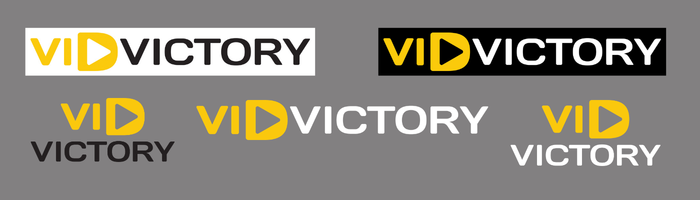
Logo variations means every variation that a design team might need. This means variations in styles of logos, but it also means sizes, file types, colors, and versions. You should also have versions with and without transparent backgrounds. You should have logos big enough to be used in ads and small enough to be used as icons. You should have versions for social media and vector files that can scale as big as you need them to.
It’s important to have your different logo variations here because different variations can be useful in different settings. Here are a few VidVictory logo variations. It should be pretty easy to see here how these would be useful for different use cases. (Gray background added to help with visibility).
This might sound like a lot of work. The good news is that you probably already have most of these files somewhere. Odds are good you have used them and may even know where most of them are. The ones that I see missing most often are the larger versions with transparent backgrounds. These are usually .png files. The other one that I see missing frequently is the vector version of the logo. Vectors are typically .ai, .eps or .svg.
If you don’t know where some of these assets are; talk to your graphic designer. Even if they designed the logo years ago they often hold on to old files for their portfolio. They can likely help you gather some of these.
Company Fonts
Many smaller companies may not have decided on company fonts, but it’s something I strongly recommend. These fonts can change with time so you’re not locked in if you decide to change. Adding additional fonts to your style guide isn’t hard if you feel like you need to.
It’s ideal to have several fonts that can be used to convey different things. Whatever fonts you choose it’s worth making sure you have access to the original font files so that you can make sure that any designer in your company or outside your company can use the exact versions of your fonts. Most fonts have quite a few variations in weight, styles, default kerning etc…so two fonts that have the same name may or my not actually be the exact same font. It’s very easy to have the font files in your brand kit and can help avoid confusion down the line.
If you’re looking for some ideas for company fonts I recommend using fonts from Google. Google has a wide variety fonts and they are free and easy to work with.
Here is where you can browse Google’s fonts – https://fonts.google.com/
I also recommend avoiding gimmicky or over used fonts. Some examples of this are Comic Sans and Papyrus.
Brand Colors
When it comes to brand colors I created this document for VidVictory. It’s easy to visually see how the colors feel side by side. The hex codes are also written there for ease. I also wrote the hex codes in the brand bible so they can be copied and pasted. From there they can be used in Canva, Photoshop and Illustrator.
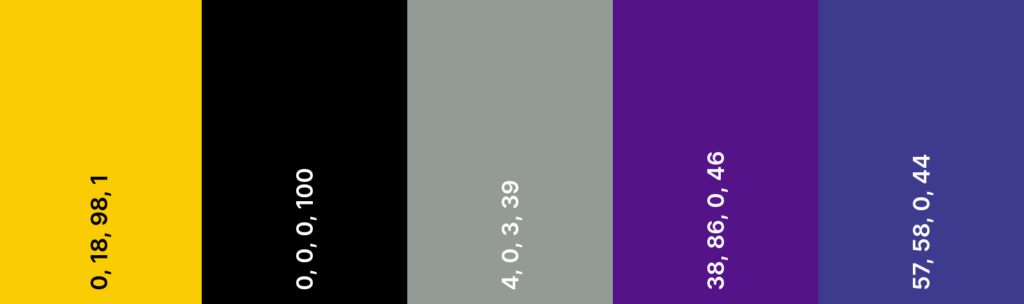
If you don’t have brand colors yet there are actually some great tools out there to help with this. Also it’s best to be precise with your brand colors. “Yellow” and “Blue” are not brand colors. You need to be able to give a designer the specific color code so that your brand can stay consistent everywhere.
Useful Videos Clips
If you have a standard intro, outro or title card that you like to use for everything those should be in your brand kit.
Videos that you use or reference frequently should also be in your brand kit.
If you have a style that you want your creative assets to be like I recommend keeping a video reference in your brand kit. A good example of this is; if you want your videos to feel like a particular commercial or a specific YouTuber. Find those videos, figure out how to download them from Youtube and have them available for designers to reference.
The Brand Bible
A brand bible is an easy way to make sure everyone is working from the same playbook when it comes to your brand. Ideally it’s a PDF that explains how to use all the assets in your brand kit. It will show how and when to use font variations. It will show how and when to use logo variations and more. The brand bible will have notes on the brand’s voice and style. It also may contain a few “thou shalt nots”. These may be ways the logo or fonts must NOT be used.
The guiding idea behind a brand bible is that anyone should be able to pick it up and make content for you that is brand compliant if they follow it.
The Wrap Up
At the end of the day this may feel like a lot of work, but it should only be a lot of work one time. From there it will save you hours of frustration having to dig up these assets one by one as they are scattered across your Google Drive, Dropbox, Box, internal server or any and all of these! It will also help improve your brand consistency, even if you are a team of one.
So get out there, create your brand kit and start making your brand victorious!